Encryption Key Management That Adapts to Any Environment
StorMagic SvKMS is an encryption key management solution that can be deployed in any environment. It simplifies complex security and key management infrastructure by providing centralized management and, illustrated below, the ability to deploy a KMS to wherever it is needed. This makes it perfect not only for the datacenter, but for the cloud and edge computing environments as well.
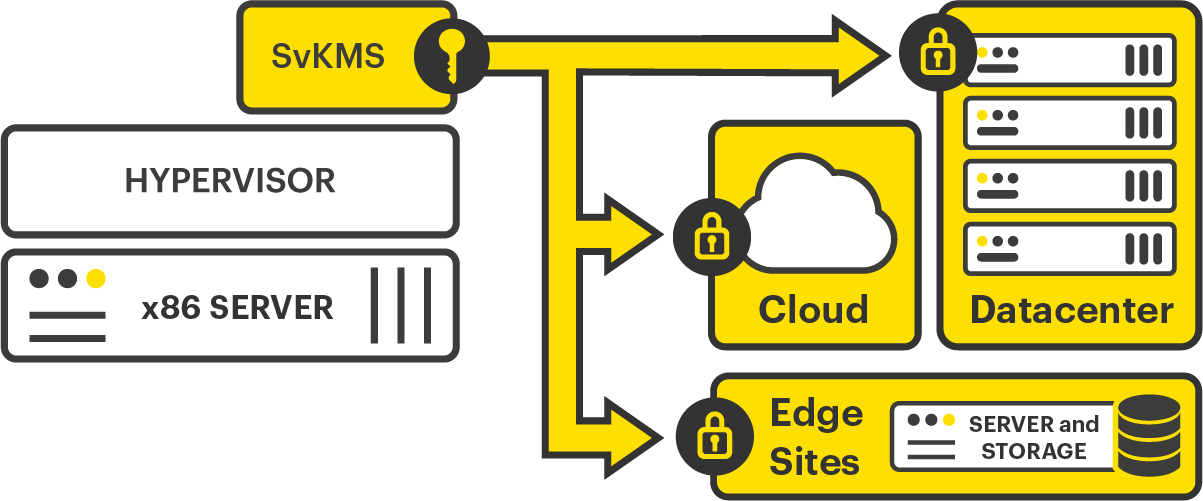
Whether on-prem, cloud or multi-cloud, SvKMS offers organizations the flexibility to locate their key management resources where required. It eliminates the need for hardware security modules (HSMs) and uses a REST API for easy integrations into any workflow with custom key imports facilitating an easy transition from legacy solutions.
SvKMS uses an embedded FIPS 140-2 (Level 1) validated cryptographic module (KeyNexus KMSM v1.0, Certificate #3594) running on the SvKMS platform per FIPS 140-2 Implementation Guidance section G.5 guidelines.
StorMagic SvKMS allows advanced identification and access management through SAML 2.0, and can be configured as a single- or multi-tenanted solution, making it an ideal choice for managed security solution providers.
This data sheet is broken down into four sections, covering the features in SvKMS, its requirements, hardware and software compatibility, and finally support levels.
SvKMS Features
StorMagic SvKMS includes a comprehensive suite of features allowing control of the full key management lifecycle. These features are detailed in the table at the end of this document.
KMIP
SvKMS has been built around maximizing the KMIP open standard to enable organizations to leverage it as part of their key management operations. With SvKMS you can centrally manage, store, and consolidate encryption key management tasks across cloud, SaaS, on-premises systems, and endpoint devices like mobile and IoT.
BYOK
SvKMS gives customers the ability to deploy a flexible architecture with an option to bring your own key (BYOK). BYOK ensures encryption keys remain in the hands of the business, regardless of location. This gives business users control for data held off-premises – if the content owner disables access to the keys, it becomes impossible for the information to be decrypted by any third party.
Custom Key Import
Over time, an organization may have anything from hundreds to millions of keys being used within a complex cryptographic environment. SvKMS’s custom key import feature allows users to import keys that may have created by another key manager in a common format, or through a custom algorithm – including PGP, GPG, DES, CAST and Blowfish.
REST API Integration and Automation
Manually addressing all key management functions at the application level is time-consuming and inefficient, and old-style key managers are driven by complex, error-prone command line interfaces. StorMagic SvKMS has a flexible and robust REST API, allowing organizations to automate key management functions and create streamlined workflows.
Licensing and Pricing
SvKMS is available in three tiers, known as ‘Editions’ – Essentials, Professional and Enterprise. Each Edition determines the type of use case and scale of the key management solution required. Depending on the Edition, SvKMS can be deployed as either an on-premises, or a cloud-based subscription service known as Key Management-as-a-Service (KMaaS). Details of the features included in each SvKMS Edition are provided in the features table at the end of the data sheet. More information on how SvKMS is licensed and priced can be found on the SvKMS Pricing webpage.
All StorMagic SvKMS subscriptions include our Platinum Enterprise Support service, which provides 24 hours per day, 7 days a week maintenance and support.
A free, fully functional evaluation of SvKMS is available to download, enabling organizations to trial and experience the features and benefits of SvKMS, before purchasing.
For more information and to download an evaluation copy, visit stormagic.com/trial.
Requirements and Compatibility
StorMagic SvKMS is compatible with any x86 server, and can be run in any cloud and on any hypervisor. It also has numerous integrations with other software solutions and HSMs. Further details of these can be found in the tables below.
System Requirements
StorMagic SvKMS has the following minimum hardware requirements, listed in the table below.
| CPU | 4x vCPUs |
| Memory | 8GB RAM1 |
| Disk | 20GB HDD2 |
2 20GB HDD minimum requirement. For optimal performance, 40GB HDD recommended.
Cloud Platform Compatibility
SvKMS supports the four major cloud providers and the solution can be deployed across one, or multiple cloud providers, as required.
| Cloud Platform | SvKMS version | ||
| 2.4 | 2.5 | 2.6 | |
| Google Cloud | • | • | • |
| Amazon Web Services | • | • | • |
| Microsoft Azure | • | • | • |
| OpenStack – Version 15 (Train) | • | • | • |
Hypervisor Compatibility
SvKMS supports many different hypervisors, shown in the table below. It is installed as a VM on top of the hypervisor.
| Hypervisor | SvKMS version | |||
| 2.4 | 2.5 | 2.6 | ||
| VMware | vSphere 7.0 & updates | • | ||
| vSphere 6.7 & updates | • | • | • | |
| vSphere 6.5 & updates | • | • | • | |
| Microsoft | Windows Server 2016 | • | • | • |
| Hyper-V Server 2016 | • | • | • | |
| Linux KVM | CentOS 8.0 | • | • | • |
| CentOS 7.6 | • | • | • | |
| RHEL 8.0 | • | • | • | |
| RHEL 7.6 | • | • | • | |
| Ubuntu 18.04 LTS | • | • | • | |
| Oracle | VirtualBox 6.1 | • | • | • |
| VirtualBox 6.0 | • | • | • | |
| VirtualBox 5.2 | • | • | • | |
| Nutanix | AHV 5.10 | • | • | • |
Integrations and Supported Workloads
Once SvKMS is deployed, it can be connected and integrated into many different services and workloads. The table below lists out the current available and documented integrations, however thanks to the REST API included within SvKMS, it can also easily integrate with proprietary applications within an organization. By bringing all of these workloads into a centralized key manager, the entire key management operation is dramatically simplified and far more secure.
For more detailed information on each of these integrations, alongside many others, please visit the SvKMS integrations page of the StorMagic website. Each solution’s integration is broken down in detail, with downloadable integration guides available for each one.
| Integration | Explanation | SvKMS Version | ||
| 2.4 | 2.5 | 2.6 | ||
| AWS EC2 and S3 | Support for external key management using BYOK | • | • | • |
| Azure Key Vault Managed HSM | SvKMS can be used as an interface between Key Vault and third party HSMs | • | • | |
| Azure Storage | Support for external key management using BYOK | • | • | • |
| BitLocker | Use SvKMS to provide external, secure AES key protection for encryption and decryption of Windows drives | • | • | |
| Commvault | SvKMS is a Commvault-certified key manager and uses KMIP to protect Commvault software encryption keys stored in a CommServe database | • | • | • |
| Google Cloud EKM | Use SvKMS as an external key manager to protect data in Google Cloud, giving greater control than BYOK | • | • | |
| IBM DB2 | SvKMS can create a centralized key store when using DB2 native encryption | • | • | • |
| IBM Informix | Use KMIP for third party key management for storage space encryption (dbspaces, blobspaces, and smart blobspaces) | • | ||
| MariaDB | SvKMS acts as a centralized key store for MariaDB native encryption, via the REST API | • | • | • |
| MongoDB | Enables data-at-rest encryption through storage-based symmetric key encryption, via KMIP | • | • | • |
| MySQL | Use SvKMS as a centralized key store for MySQL encryption, via KMIP | • | • | • |
| NetApp ONTAP | SvKMS can act as a key management server for volume encryption, via KMIP | • | • | • |
| Nutanix Prism | Enables the use of self encrypting drives (SEDs), via KMIP integration | • | • | • |
| Salesforce Shield | Protect encrypted Salesforce data by using SvKMS as a key manager with BYOK | • | • | |
| Veritas NetBackup | SvKMS can act as the key management server for Veritas Netbackup encryption, via KMIP | • | • | • |
| VMware vSphere and vSAN | Enables vSphere VM encryption, via KMIP integration | • | • | • |
HSM Integrations
SvKMS also integrates with many leading HSM vendors, to provide centralized management and advanced key management capabilities to these hardware solutions that are typically favored by organizations for their reliability and ability to provide root-of-trust. The current list of compatible HSMs is detailed in the table opposite. For more information about how SvKMS integrates with HSMs, please visit the HSM extension page of the StorMagic website.
| Vendor | Model | SvKMS version | ||
| 2.4 | 2.5 | 2.6 | ||
| Utimaco | CryptoServer CP5 | • | • | • |
| Entrust | nShield Connect 5000+ | • | • | • |
| nShield Connect 6000+ | • | |||
| Thales | Luna 7.0 | • | • | |
SvKMS Feature Table
| SvKMS Features | Enterprise | Professional | Essentials |
| REST API • Allows other applications to connect, interact and integrate directly with SvKMS. • Defines a common interface for key management operations (get, fetch, rotate, create, delete, etc.) • Build automation workflows and integrate with many use cases that were limited with previous standards like PKCS#11. • Read more about the REST API feature on its dedicated feature page. |
• | • | |
| Use Cases | Unlimited | 5 | 1 |
| Unlimited Encryption Keys | • | Up to 250 | Up to 50 |
| BYOK/CSEK • Encrypt your data and retain control and management of encryption keys even in cloud computing environments. • Generate strong keys and control the secure export of keys to the cloud, thereby strengthening key management practices. • Separate the lock (encryption) from the key (encryption key) • Read more about the BYOK feature on its dedicated feature page. |
• | • | |
| KMIP Server • A cost-effective solution where only one key management service is necessary to facilitate all key encryption requirements. • SvKMS can be deployed as a KMIP Server in a virtual environment in minutes, for a fraction of the cost and effort of an HSM. • Reduces overheads/administration related to managing encrypted data, such as tape drives, databases, storage array and software, through centralized management. • Read more about the KMIP feature on its dedicated feature page. |
• | • | |
| Cluster Management and High Availability • Easily activate a new key management installation. • Simple KMS setup for both a single instance and a complex high availability cluster. |
• | • | • |
| Full Key Management Lifecycle • Ensure compliance and enact robust key policies through the entire key lifecycle, from creation to storage, archiving and deletion. |
• | • | • |
| Robust Key Management Operations | • | • | • |
| Painless Backup and Restore • Saves and stores the current SvKMS state for future restoration. • Set on-demand and scheduled backups to an external location, restoring these backups when required. |
• | • | • |
| Hybrid On-Premise/Cloud Configuration • Generate, store and provision keys onsite/on-premises, in the datacenter and/or in private, public or hybrid clouds. |
N/A | N/A | N/A |
| Proactive Insights (Manage Notifications and Alerts) • Audits all activity related to key data that can include anything from key creation, to rotation and compromise. • Provides alerts on activity in a cryptographic system that requires further investigation in order to detect and prevent breaches or other issues. |
• | • | • |
| Role-based Access Control (RBAC) • Allows the administrator to effectively segment and control who has access to various encrypted systems. • Allows groups to handle who may access a key. For example, a group for databases may allow certain key users access to unencrypt certain data but may exclude other key users within the storage group. |
• | • | • |
| HSM Extension • Supports PKCS#11 specification, allowing integration with HSMs. • Consolidates key management into one single pane of glass, while extending the life of in-house HSMs. • Can serve as an abstraction in front of an HSM, provisioning keys out through the key manager which can then perform many key management lifecycle functions. • Read more about the HSM extension feature on its dedicated feature page. |
• | ||
| TPM Protection | • | ||
| Custom Key Import • Manage old key types and secrets – such as PGP, DES, CAST and Blowfish – from the same centralized key manager. • Read more about the custom key import feature on its dedicated feature page. |
• | • | |
| Sophisticated, Single-User Interface (UI) • One key manager supports many different key management use cases, all from one interface, thus reducing time and costs. |
• | • | • |
| Detailed Auditing and Logging, Exportable to Popular SIEMs • Analyze and report on key management activities to uncover potential threats. • Collects data through the use of the syslog format, which can then be exported to external SIEM tools. |
• | • | • |
| Single Sign On | • | • |